­

NOW DAILY UPDATED

Showing posts with label Tricks. Show all posts

How to Play any YouTube Video with VLC Media Player


VLC Media Player is the most popular and free to use media player that supports all video and audio formats. It also works on Windows, Mac, Linux, Android and iOS.
Play-Youtube-Videos-on-VLC-Media-Player

VLC media player has so many features, but one of its features that will be considered in this post is its ability to play YouTube videos. Using VLC media player to play YouTube videos has so many benefits such as:
  1. Watching your videos without ads.
  2. You will be able to capture a screenshot image of any frame or scene in the YouTube video.
  3. You can change the Playback speed of the YouTube video and make it run slower or faster than the normal speed.
  4. You can also use VLC to watch YouTube videos with slow internet connection.
  5. No web browser or Adobe Flash Player would be required to play videos.

    Follow the steps below to watch YouTube videos on VLC Media Player;

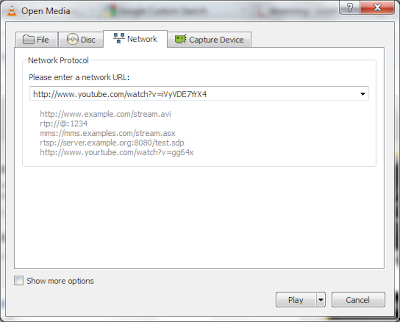
    • Launch VLC Media Player on your computer and then navigate to Media ==> Open Network Stream.
    • Play-Youtube-Videos-on-VLC
    • Now paste the YouTube video URL you want to play
    • How-to-Play-Youtube-Videos-on-VLC-Media-Player
    • Finally click on the Play button, to start viewing your YouTube video on VLC Media Player. 

Tips To Make Computer Games Run Faster


If you’re using an old computer, running 3D computer games like Pro Evolution Soccer, God of War, Call of Duty 4 and the rest might be kind of slow due to high graphic requirements modern games come with. With many installations, useless Windows processes and lots of applications running in the background, CPU usage gets high and there’s a depletion of random access memory (RAM). To make computer games run faster, there are some basic things to do:
1. Reduce the game quality from the game settings
2. Adjust your video card settings and reduce the quality as well
3. Reduce screen resolution for the game
4. Close all running applications before starting a game
5. Stop unnecessary windows processes
6. Starting the game after a restart sometimes increases the speed
7. Install more memory. Increasing your RAM from just 1GB to 2GB or 4GB will make a major difference
8. Update your video card drivers
9. Change your video card if you have to. I recommend Nvidia over ATI though it isn’t bad either. Forget about Intel.
10. Check for malwares and update your antivirus. Running a registry cleaner too helps

If you intend to run you computer game at an optimized speed without necessarily reducing the game quality, then what you need is Game Booster. Game Booster allows you to tweak your system and increase PC performance. It stops all unneeded applications and windows processes, cleans up the RAM and makes your computer game run at optimum speed.
Major Features:
* Game Booster v3 can easily and fast close background processes and unnecessary Windows services, to speed up you game playing and avoid possible conflicts and incompatibility. With the innovative “Enhanced 3rd parties’ services detection” technology, Game Booster v3 can automatically detect and close more unnecessary background services.
* Fine-tunes mouse, keyboard, and specialized game controllers with ease
* Game Booster v3 can tweak your PC for the ultimate system and Internet speed with a single click
* With the improved defragment engine, Game Booster v3 can quickly defragment game directories and files, to make your games load and run faster than ever
* PC gamers know how important to install new drivers for modern PC games. Now Game Booster v3 keeps every game’s specialized drivers up-to-date, including drivers for video/sound cards.
* Game Booster v3 does not overclock your hardware. Game Booster v3 is a freeware, without any virus, adware, and spyware
Game booster does all that with just one click and optimizes your computer’s performance making that game run faster!

How to Add Pop-Up Warning to Blog


A reader wanted to know how he could add a pop up warning to his blog which is displayed just before the blog opens.


This can be done using Javascript code. Hence if the viewer has disabled Javascript on his blog this may not work. Also many viewers have pop-up blockers in place which may also prevent the display of this mesage.


To add it in your blog follow these steps :

1. Login at Blogger.com.

2. On the Blogger Dashboard which opens for a successful login click the 'Layout' link.

3. The Page Elements subtab of Template tab will open.

4. Click the Edit Html subtab of Template tab.

5. On the Edit Html subtab scroll down in the Template Code box.

6. Copy the code below :
<script language='JavaScript'>
//
alert (&quot;This is a Demo Pop Up Window where you can put any Messages to viewers!&quot;)
</script>


7. Paste the code above between </head> and ]]></b:skin> tags in your template. Replace "This is a Demo Pop Up Window where you can put any Messages to viewers!" with your own message.

8. Save the template.

9. Clear Cache and View Blog.


Comment Below. Your Comments Are Valuable For Us..

How to download torrent file from Internet Download manager

As you know guys Torrent is one of the most popular website for download stuffs like movies games etc.
but the main problem is here that all the torrents don't have any good seeds and peers as a result they don't
give fast download speed . we have to wait for many hours to download a big file .

so here is a good trick for all of you guys . you can dwnload any torrent file by using this cool website name ZbigZ .

ZbigZ simply grab a torrent link and gives you a direct HTTPS download link which can downloaded using good download manager .


How to use it :

Simply go to ZbigZ .

Click on Sign up . Make one account there .

Now go to http://torrentz.eu/ and search for the file you want to download .

Now again come to ZbigZ . Upload your torrent file and Click on GO FREE .


or you can also put a link of torrent file .


Now comes to the most difficult part . Download the file by clicking on Download option =)

Your download will start in 5 secs. 


Its totally for free and can be used on daily basis to download huge torrent files faster and anonymously , so if you enjoyed this article do share with your friends .


Wamiq MIrza..

Please Comment Below.. Join Our Facebook Page By Clicking HERE

Change your Ip in less then 1 minute

Friends i will show you how to change ip address in less then a minute. For now it will take 2 to 3 minutes but with some practice you can do this within a minute.


  • Click on "Start" in the bottom left corner of the screen.
  • Click on "RUN"
  • Type in "command" and click OK

      You should be now at MSDOS prompt Screen

  • Type "ipconfig /releasejust like that, and press "enter"
  • Type "exit" and leave the prompt
  • Right-click on "Network Places" or "My Network Places" on your desktop.
  • Click on "properties"

     Now you should  be on a screen with something titled "Local AreaConnection", or something  similar to that, and, if you have a network hooked up, all of your other networks.

  •  Right click on "Local Area Connection" and click "properties"
  • Double-click on the "Internet Protocol (TCP/IP)" from the list under the "General" tab
  • Click on "Use the following IP address" under the "General" tab
  • Create an IP address (It doesn't matter what it is)
  • Press "Tab" and it should automatically fill in the "Subnet Mask" section with default numbers.
  • Press the "Ok" button here
  • Hit the "Ok" button again

     Now you should be back to the "Local Area Connection" screen.

  • Right-click back on "Local Area Connection" and go to properties again.
  • Go back to the "TCP/IP" settings
  • This time, select "Obtain an IP address automatically"
  • Click on "Ok"
  • Hit "Ok" again.
  • Now you have a New IP address.

How to Update Facebook Status with Twitter Tweets


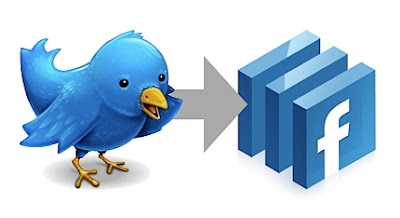
In my previous post, I shared How To Tweet More than 140 Character In Twitter and I promised to share how you can also update your Facebook status with your Twitter tweets.
Update-Facebook-Account-With-Twitter-Tweet

To link your Twitter account to Facebook profile (or page) is very easy and you can get it to work by following the steps outlined below. 
  • Login to your twitter account
  • Click on your profile name
  • Click on edit your profile link
  • Click on “Post your Tweets to Facebook” on your profile page
  • You will be required to log in to your Facebook Account and then click yes and allow Twitter to post and manage your statuses
  • If you only want your tweets to appear on your profile, click save changes. But if you want to connect it to your page, then click ‘My Facebook page’ box and then select the page you want to add and then click save.

You have now connects your twitter account with Facebook profile (or page). So whenever you tweet, it will automatically show on your Facebook profile with a blue bird showing via twitter. 

In case you want to stop this in the future just go back to your Twitter account profile and click on disconnect. 

Question: Did this work for you? How has this changed your use of Facebook and Twitter.

Stay Informed, Inspired and Motivated With Our Free Daily Tips.

How To Delete Facebook Account Permanently

As we know that on the main page of Facebook account there is no delete option , only the deactivate option are there . what if a user want to delete his account ? In starting Facebook were so interesting and if we see the stats of Facebook in 2010 there are more than 10 million users are connected with Facebook .

My many friends want to delete their account but whenever they tried there is only one option " Deactivate your profile " .

If you want to delete your facebook account just follow the steps .


  • Go to Facebook Help Page  . 
  • Write " delete " in search box . you will get first option of deleting Facebook account .

Choose the option and follow the steps . 

If you are Lazy Like me then just go to this LINK  . You will see a option to delete your account . 


Proceed and Facebook will give you the time of 15 days . Your Account will Delete After 15 days .

How To Download Facebook Videos


Have you ever notice that you cant download those video's which are posted by your friend on Facebook ?

Oh..!!Yes you did that's the reason you are here .

By the way this Post is all about Downloading Videos .

Before starting i have one question for you guys ? You know how to download YouTube video from your mobile browser without using any software ? 


Now come to the point . How to Download Facebook Video ? 

Answer is By using Facebook Video Downloader  . This is not a software , this is actually a website which allows you to download the Facebook video by entering URL .

Go to Facebook Video Downloader i.e actually an site , now enter your video URL there , and click on Download .

Video URL : http://www.facebook.com/video/video.php?v=136668924333   It will look something like this . 

Note : If you are using Internet Download Manager then Your downloading will start in some seconds. 
But if you are not using internet Download manager then it will give you a direct link of the video , Right click on the video and select ( " save link as " ) . your downloading will start and you can now edit it and upload it on everywhere :) 

If you have any query about Facebook Video then get in touch through comment box . we will love to solve your problem . 

Send UNLIMITED FREE SMS to your friends/family from Gmail | Free Download Zone .in| Free,full version,life time software | New tricks-tips| Problem solution

Increase Torrent Downloading Speed using Torrent Booster

Increase your uTorrent Speed by using Torrent Booster , We all use torrent for to download latest movie , live shows , latest album etc . But the main problem most of we face is the downloading speed . We have good internet connection but still we don't get high speed through Torrent . 
In this Topic i will tell you how can you increase your Torrent downloading speed by using Torrent Booster . 

Torrent Booster is a tool which helps you to get high downloading speed. Its easy to use and its very useful .

How much speed you will get ?

Well this tool helps you to get high downloading speed but it doesn't mean if you are using your internet from mobile and you will get 1mbps speed ? comeon just don't kid yourself . Downloading speed will work according to your Internet Connection . If your internet connection is good then you will get surely a good downloading speed .


Download and How to use ?


Dowload Torrent Booster  . There are also some video tutorials you can watch them if you want and all the necessary information is also providing their so i am not going to write whole thing . [ Just want to make this tutorial short ] 

Just Download the Tool from given link and run . Below is the snapshot of Torrent Booster v3.9 


It is easy to use , just run and choose your torrent . But still if you don't know how to use it then you can see some tutorial from its website page .

Its worked for me so i recommend you to use too .

Posted By WAMIQ ♥♥♥

Speed Up Your Mozilla Firefox 40 to 100 Times Faster

I am back with a very useful trick , How to increasing the browsing speed of your Mozilla Firefox browser .

by this trick you can speed up your browser speed from 40 to 100 times faster .

Steps :

  • Open your Mozilla Firefox Browser .
  • Write in address bar " about:config " and click on continue .
After that you will see a page like this 
  • Search for " network.http.pipelining " , its Value will be " false " by defualt , so double click on it and make it  " true " .
  • Next search for " network.http.proxy.pipelining " and make it " true " , as you did in last step .
  • Next Search for " network.http.pipelining.maxrequests " and double click on it and change the integer value to 60 , 50 , 100 whatever you want . 
Last Step : 

Right Click anywhere on the screen ad select new --- > integer .

and put the integer value to " 0 " . Restart your browser and you are done .

For any problem just drop me a Hi in comments , i write this article in hurry . :) 

Auto Reply to All Your Facebook Birthday Wishes


Recently i found a Facebook App which can allow you to say thanks Automataically to those who wishes you on your birthday. So today, I want to share a simple way you can auto reply to all your Facebook birthday wishes even when you’re not on Facebook that day.
Auto-Reply-all-Facebook-Birthday-Wishes

There is an application that you can use to thank your friends for the birthday wishes they posted on your wall automatically. With this application, you can either auto comment a “Thank You Message” or auto “Like” the birthday wishes. Better still, you can combine the two together i.e. (Thank You Message and Like)

Steps to Auto Reply to All Your Facebook Birthday Wishes

==> Login to your Facebook account, go to Say Thank You app and allow it to access your Facebook profile

==> Now that you have grant the application access to your profile, now set your birthday date/month/year.

==> Now select how you want the application to respond to your friends who have posted a birthday wishes on your wall by choosing either Comment Only or Like Only or Comment & Like or Wall Post.


==> Finally, you will need to select your Facebook friends you want to thank for the wishes they sent to you.


Please Dont Just Read and go. Kindly post your comments to make us Better.
Thank you :)

CUSTOMIZE OUR WEBCAM USING " MYCAM "

You use your Cam to video chat with your friends or Do you have relatives or friend who live in some
other country and use Skype for video chat ? Then here is a good news for you guys , actually i don't go on cam much because of my shyness well yeah i am little shy type of person but my friend told me to come on cam and i created an account on Skype and before going to cam i checked my webcam and i was shocked ? damn i was looking so ugly :P Because of the backlight and all . So I download the software name " Mycam " to adjust the width height and everything . in this tutorial i will teach you how can make you look good on webcam .


Mycam is compatible with many major websites like Skype , Paltalk , Yahoo messenger , Facebook , Google+ hangout and with many more.


Features .

  • Add Avatars . 
  • Add many cool Effects .
  • Add Background . 
  • You can share your screen .
  • Play movies , play music which other person can also hear .

How to use .

Download the Mycam Software its official website . 


Download the Mycam software from above link and install it [ its size is around 10mb ] . 

Now if your chatting on Skype then go to video setting and change camera to Mycam .

Well actually you can also use this while chatting with your friends , it will appear at the bottom of your desktop . Open it and change its contrast and brightness . 

Now don't afraid to go on cam , say Yes to Video chat . :D 

Enjoy . if you are getting any problem to setup this software then please let me know in comments and nothing in this world will stop me to help you . :] . 
If You Like This Work Then Comment Below..

Hide Files or Folders Using Command Prompt

Trick to hide files and folders using Command Prompt
The most important thing is that, once hidden with this method, the files/folders cannot be viewed by any search options even if you click "Show All Hidden Files and Folders".

Hiding the most wanted files and folders is very important nowadays and it's really a tedious job too. In order to make this tedious job an easy one, i'm going to deliver you a the trick now.

For Example: You have a folder named "collegephotos" and this folder is stored in (Disk Drive E). You think that it should not be seen by strangers who use your PC.
 
For that you need to follow the following instructions


  1. Press windowkey+R: Run command dialog box appears.
  2. Now type "cmd" and hit enter. A command prompt window displays.
  3. Now type "attrib +s +h E:\collegephotos" and hit enter.
  4. The folder "collegephotos" will be hidden (Note: It cannot be viewed by any search options)

    (To view this folder again, use the same command but replace '+' with '-' on both flags 's' and 'h')


Our free services:

Get our toolbar!

Related Posts Plugin for WordPress, Blogger...


Contributors

Total Pageviews

Please Visit This Add

Followers

Copyright @ CODEXTRA PVT. LTD. Powered by Blogger.